
Avtor Igor Fabjan• 3:00 pop• ZANIMIVO

Sirovke – gobe za sladokusce

Sirovke - gobe za sladokusce

Letošnja jesen nas je med drugim bogato obdarila z gobami. Rastejo dobesedno povsod in gobarske sezone še ni konec. Jurčkom že malo pohaja sapa, a v gozdovih je še polno drugih gob. Ene izmed morda manj privlačnih a zato zelo okusnih so užitne sirovke (lactarius deliciosus) iz roda mlečnic.

Kako jih prepoznamo?

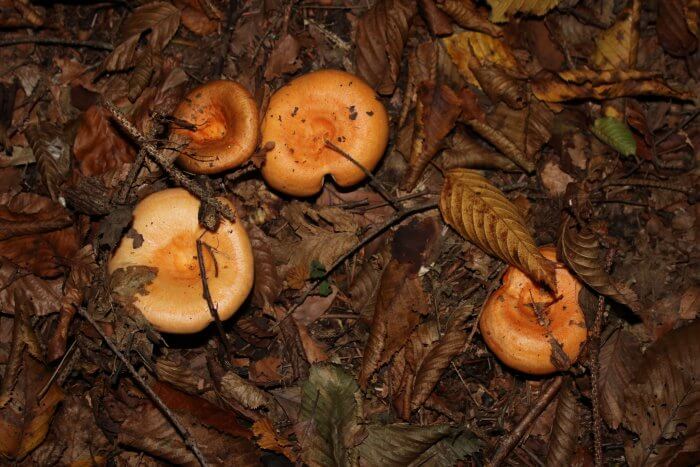
Ni jih težko prepoznati, čeprav so podobne mnogim sorodnim gobam. A od njih se pomembno razlikujejo po tem, da izločajo živo oranžno-rdeč mleček, če jih prelomimo. Mleček na zraku potemni. Podoben mleček izločajo še nekatere vrste užitnih sirovk (lososova, navadna, smrekova), če je bel, pa lahko niso užitne ali so celo strupene.

Klobuk je pogosto okrogle oblike, velik do 15 cm, sprva s podvitim robom, obarvan rjavo oranžno, lahko pa tudi rahlo zeleno, včasih zaznamovan s temnejšimi kolobarji. Lističi trosovnice so podobne barve kot klobuk. Do kakšnih 9 cm dolg bet je votel in pokrit z jamičastimi lisami. Meso je trdo a krhko, prijetnega okusa.

Sirovke običajno rastejo na vlažnih obronkih gozdov, nekje od konca julija pa vse do novembra.

Začimb sploh ne potrebujejo!

Najenostavneje jih pripravimo tako, da jih samo popečemo na žaru ali pa na olju. Ker imajo izrazit okus, začimbe niso nujno potrebne. Sirovke lahko spečemo z jajci, pripravimo v rižoti ali pa dodajamo juham in omakam. Dobre so tudi vložene, lahko jih zamrznemo, za sušenje pa se ne obnesejo najbolje, ker počrnijo.

IMG_7425

Foto: Igor Fabjan

(Visited 8.166 times, 15 visits today)
↑
Close

Center Nastavitev Zasebnosti

Obvezni piškotki

Shranijo uporabnikovo odločitev glede sprejemanja piškotkov.

gdpr[allowed_cookies], gdpr[consent_types]: beleži uporabniško odločitev glede sprejetja ali zavrnitev uporabe piškotkov. Veljavnost: 1 leto.

Socialna omrežja

Facebook vtičnik; za povečanje sodelovanja naših uporabnikov preko družbenih omrežij, analizo prodaje, segmentacijo uporabnikov in ponovno targetiranje uporabnikov

c_user, datr, fr, pl, presence, sb, wd, xs, pnl_data2, act

Analitika

Analitika nam omogoča, da merimo število uporabnikov v obliki obiskov in klikov.

advanced_ads_browser_width, advanced_ads_page_impressions, advanced_ads_pro_server_info, advanced_ads_pro_visitor_referrer
_ga: merjenje obiskanosti s storitvijo Google Analytics. Veljavnost: 2 leti. _gat: piškotek ne hrani uporabniških podatkov, uporablja se za omejevanje pogostosti zadetkov pri merjenju obiskanosti strani s storitvijo Google Analytics. Veljavnost: 10 minut. _gid: naključno ustvarjeno unikatno število se uporablja za izračun podatkov o obisku našega spletnega mesta. s storitvijo Google Analytics. Veljavnost: 24 ur.

Analiza obiska

To function properly, Hotjar stores first-party cookies on your visitor's browser. Cookies are either set by the Hotjar script, or by visiting Hotjar's website. Displaying the correct content to your visitors without personally identifying anyone relies on Hotjar's cookies.

_hjClosedSurveyInvites Hotjar cookie. This cookie is set once a visitor interacts with a Survey invitation modal popup. It is used to ensure that the same invite does not re-appear if it has already been shown. 365 days _hjDonePolls Hotjar cookie. This cookie is set once a visitor completes a poll using the Feedback Poll widget. It is used to ensure that the same poll does not re-appear if it has already been filled in. 365 days _hjMinimizedPolls Hotjar cookie. This cookie is set once a visitor minimizes a Feedback Poll widget. It is used to ensure that the widget stays minimizes when the visitor navigates through your site. 365 days _hjDoneTestersWidgets Hotjar cookie. This cookie is set once a visitor submits their information in the Recruit User Testers widget. It is used to ensure that the same form does not re-appear if it has already been filled in. 365 days _hjIncludedInSample Hotjar cookie. This session cookie is set to let Hotjar know whether that visitor is included in the sample which is used to generate funnels. 365 days _hjShownFeedbackMessage This cookie is set when a visitor minimizes or completes Incoming Feedback. This is done so that the Incoming Feedback will load as minimized immediately if they navigate to another page where it is set to show. 365 days _hjid Hotjar cookie. This cookie is set when the customer first lands on a page with the Hotjar script. It is used to persist the Hotjar User ID, unique to that site on the browser. This ensures that behavior in subsequent visits to the same site will be attributed to the same user ID. 365 days _hjRecordingLastActivity This should be found in sessionStorage (as opposed to cookies). This gets updated when a visitor recording starts and when data is sent through the WebSocket (the visitor performs an action that Hotjar records). Session hjTLDTest When the Hotjar script executes we try to determine the most generic cookie path we should use, instead of the page hostname. This is done so that cookies can be shared across subdomains (where applicable). To determine this, we try to store the _hjTLDTest cookie for different URL substring alternatives until it fails. After this check, the cookie is removed. Session _hjUserAttributesHash User Attributes sent through the Hotjar Identify API are cached for the duration of the session in order to know when an attribute has changed and needs to be updated. Session _hjCachedUserAttributes This cookie stores User Attributes which are sent through the Hotjar Identify API, whenever the user is not in the sample. These attributes will only be saved if the user interacts with a Hotjar Feedback tool. Session _hjLocalStorageTest This cookie is used to check if the Hotjar Tracking Script can use local storage. If it can, a value of 1 is set in this cookie. The data stored in_hjLocalStorageTest has no expiration time, but it is deleted immediately after creating it so the expected storage time is under 100ms. N/A _hjptid This cookie is set for logged in users of Hotjar, who have Admin Team Member permissions. It is used during pricing experiments to show the Admin consistent pricing across the site. Session _hjAbsoluteSessionInProgress The cookie is set so Hotjar can track the beginning of the user's journey for a total session count. It does not contain any identifiable information. 30 minutes